
That towering stack of paper on your desk? It’s not just clutter. It’s costing you money, time, and peace of mind. A single employee can waste up to 400 hours a year searching for paper documents. Let that sink in. That’s ten full work weeks. Gone.
But what if you could reclaim that time? What if you could find any document—an invoice from last quarter, a client contract from three years ago—in less than ten seconds? That’s not a fantasy. It’s the reality of a well-executed digital filing system.
This isn’t another generic list of tips. This is a battle-tested blueprint, refined from years of helping businesses escape paper prisons. You’re about to learn how to design and implement a system that’s not just organized, but intuitive, secure, and built to last. Let’s get started.
Paper vs. Digital: The Brutal Truth About Your Filing Cabinet
Before we build the future, let’s be honest about the past. The traditional filing cabinet is a relic, and clinging to it is actively holding you back. It feels safe and familiar, but the hidden costs are staggering. We’re talking about more than just the price of paper and ink.
It’s the wasted payroll on searching. The cost of office space for storage. The catastrophic risk of fire, flood, or simple misplacement. In our experience, most businesses dramatically underestimate these “soft costs” until they see them laid out. Look, the debate is over. The data is clear.
| Factor | 📄 Paper-Based System | 💻 Digital Filing System |
|---|---|---|
| Search Time | Minutes to hours per document | Seconds per document |
| Accessibility | Limited to one physical location | Global access from any device |
| Security | Vulnerable to theft, fire, flood, misplacement | Encrypted, password-protected, with access logs |
| Collaboration | Slow, requires copying and physical hand-offs | Instant, real-time, with version control |
| Disaster Recovery | Extremely difficult or impossible | Simple restoration from cloud backups |
| Annual Cost (per employee) | High (paper, ink, storage, wasted time) | Low (software subscription, minimal overhead) |
🎯 Key Takeaway
A digital filing system isn’t a simple upgrade; it’s a fundamental business transformation. It shifts your most valuable asset—information—from a physical liability into a secure, instantly accessible strategic tool that saves thousands in hidden costs.
Choosing Your Weapon: Cloud Storage vs. a Full-Blown DMS
Okay, you’re convinced. But where do you start? The software you choose is the foundation of your entire system. This decision boils down to one question: do you need a simple storage locker or a smart, automated office assistant?
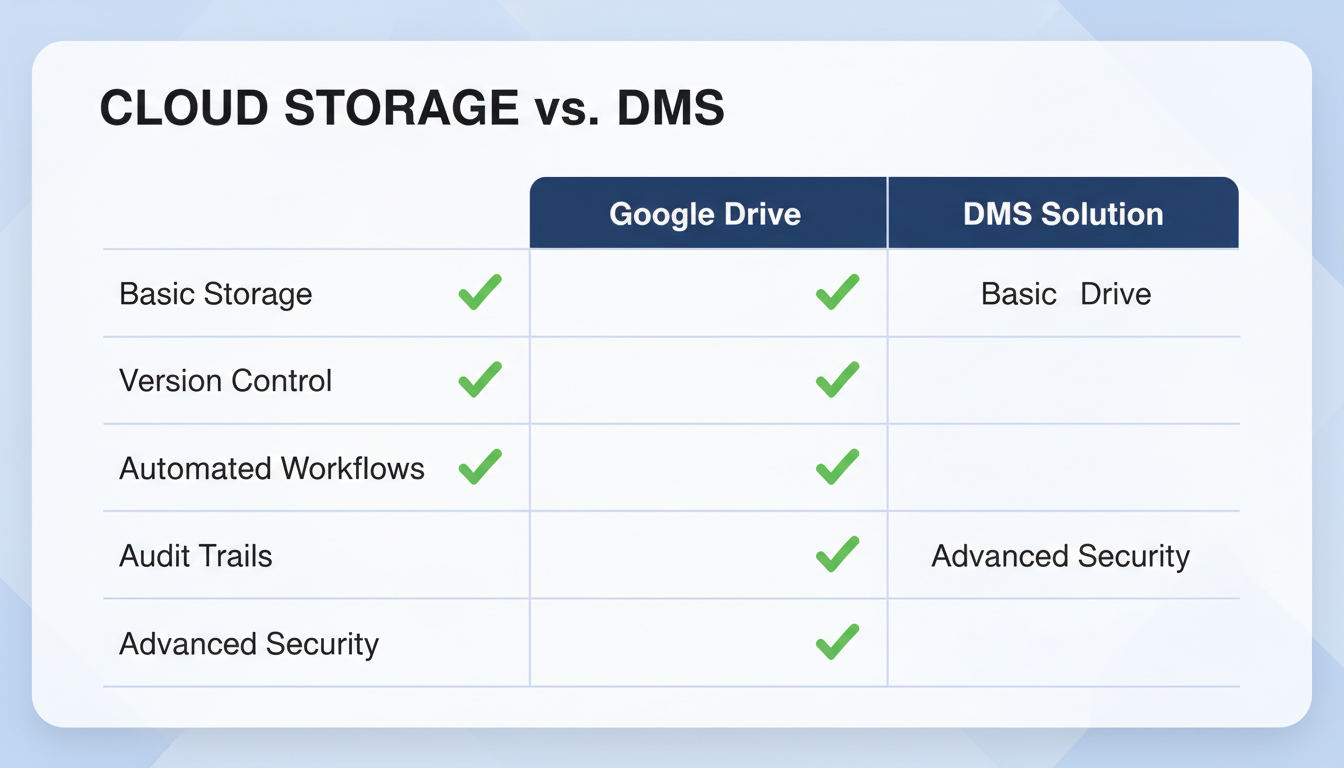
For freelancers or very small teams, basic Cloud Storage Services (CSS) like Google Drive or Dropbox are often enough. They’re fantastic for storing files and basic sharing. Think of them as digital filing cabinets.
But for most growing businesses, a dedicated Document Management System (DMS) is the right move. A DMS is an intelligent platform built for business workflows. It doesn’t just store files; it manages them with features like automated version control, granular user permissions, and detailed audit trails for compliance. It’s the central nervous system for your company’s information.
💡 Pro Tip
Don’t pay for features you won’t use. Start by mapping your non-negotiable needs. Do you need to track who approves invoices? You need a DMS. Do you just need a place to save and share final project files? Cloud storage might be perfect. The right tool is the one that solves your specific problems.
The 7-Step Blueprint to a Flawless Paperless Office in 2026
Transitioning to a digital filing system can feel like a monumental task. I’ve seen companies get paralyzed by the sheer scale of it. But you won’t. You’re going to follow a proven, step-by-step process that breaks it down into manageable chunks and guarantees success.
Step 1: Audit Your Document Lifecycle
Before you scan a single page, you need to understand how information flows through your organization. Forget your current folders for a moment and ask the real questions:
- Creation: Where do documents like invoices, contracts, and reports come from?
- Processing: Who needs to see, edit, or approve them? What’s the sequence?
- Storage: Where does the final version need to live? Who needs access?
- Retention: How long must you legally keep it? (Consult a professional for this!)
- Destruction: When and how is it securely deleted?
Mapping this out reveals the bottlenecks and inefficiencies in your current process. You’re not just digitizing paper; you’re optimizing your entire workflow.
Step 2: Design Your “Single Source of Truth” Architecture
This is the most critical step. A bad structure will doom your system. The goal is a logical, scalable hierarchy that anyone can understand without a manual. A best practice we recommend is a top-down approach:
Department > Category > Year > Project/Client > File
Example: /Finance/Invoices/2026/Client-ABC/2026-10-25_INV12345_Final.pdf
The real magic, however, is in a non-negotiable file naming convention. A consistent format like YYYY-MM-DD_DocumentType_Description.pdf makes files automatically sort chronologically and instantly identifiable. Enforce it. No exceptions.
Step 3: Digitize Your Existing Paper Archive
Time to tackle the paper mountain. You have two choices: do it in-house or outsource. For a few boxes, a high-quality desktop scanner with an automatic document feeder (ADF) is a solid investment. For an entire file room, a professional scanning service is worth every penny.
The key technology here is Optical Character Recognition (OCR). OCR software converts the image of a scanned document into searchable text. Without it, your scanned PDF is just a “dumb” picture of a document. With OCR, it’s a fully searchable, intelligent file. It’s non-negotiable.
⚠️ Watch Out
Don’t just scan everything blindly. This is your chance to purge. Decide on a cut-off date (e.g., “we will only scan active files from the last 5 years”). Shred what you don’t need to keep for legal or compliance reasons. Digitizing junk just creates a faster, more expensive junk drawer. MSME Registration for Small Business: Easy Guide
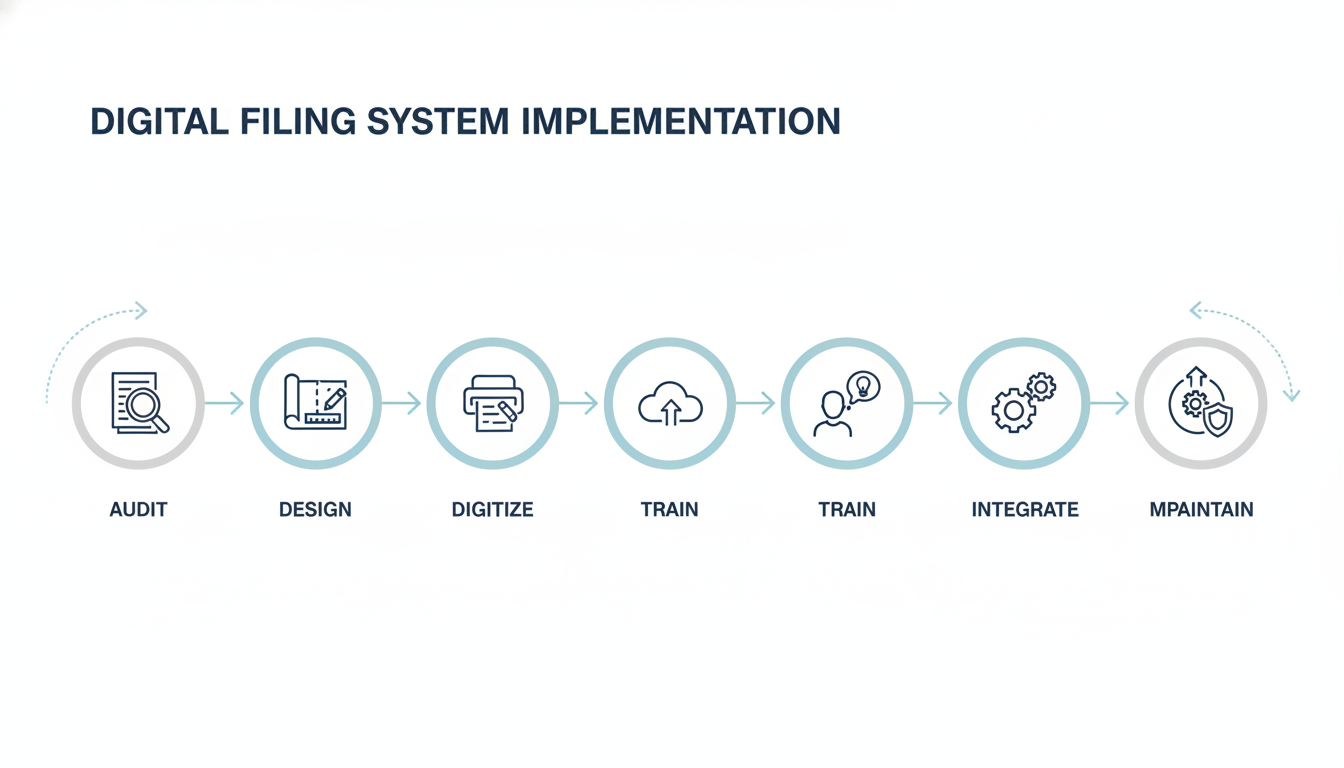
Step 4: Implement the System & Train for Ironclad Adoption
A brilliant system that no one uses is a failure. Don’t just send an email and hope for the best. You need to champion this change. 7 Master Strategies for Effective Cash Flow Tax Planning in 2024
- Hold a Kick-off Meeting: Explain the “why” behind the change—less time searching, easier collaboration, better security. Get your team excited.
- Conduct Hands-On Training: Walk everyone through the new structure, the naming convention, and the core software features. Let them practice.
- Create a One-Page Cheat Sheet: Document the folder structure and naming rules in a simple PDF. Pin it in a shared channel. Make it impossible to forget.
From our experience, consistent reinforcement from leadership in the first 30 days is what separates a successful rollout from a frustrating flop.
Step 5: Weave It Into Your Daily Workflow
The goal is to make the digital system the path of least resistance. Configure your office scanner to save directly into an “Incoming Scans” folder within the DMS. Teach your team to save email attachments directly to the system, not their desktops. If your DMS integrates with your accounting or CRM software, set it up! The more seamless it is, the more naturally your team will adopt it.
Step 6: Secure Your Digital Assets
Your digital files are now a core business asset. Protect them accordingly. This isn’t just about preventing hacks; it’s about ensuring business continuity.
- Access Control: Use the principle of least privilege. Team members should only have access to the folders they absolutely need for their job.
- Authentication: Enforce strong passwords and enable multi-factor authentication (MFA) everywhere you can.
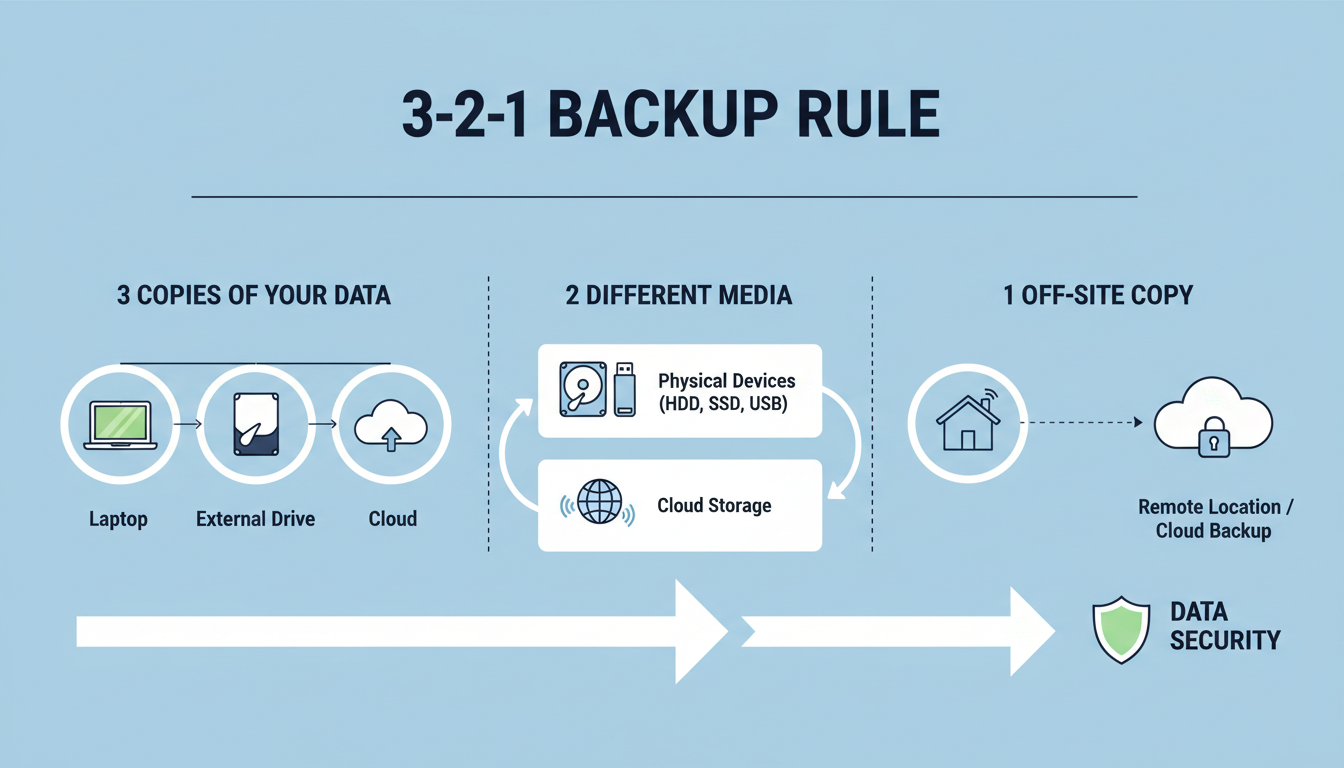
- Backups: Implement the 3-2-1 backup rule. Three copies of your data, on two different types of media, with at least one copy stored off-site (the cloud counts!).
Following established guidelines, like those in the NIST Cybersecurity Framework, provides a robust structure for protecting your information.
Step 7: Schedule a “Set & Review” Cadence
A digital filing system is a garden, not a sculpture. It needs tending. Schedule a quarterly or bi-annual review to:
- Archive Old Files: Move completed projects or outdated financial years to a separate “Archive” folder to keep your active system lean and fast.
- Audit Permissions: Review who has access to what. Remove permissions for employees who have changed roles or left the company.
- Gather Feedback: Ask your team what’s working and what isn’t. A small tweak to the folder structure could save hours down the line.
⚠️ Watch Out
Beware of “permission creep.” Over time, it’s easy to grant temporary access to folders and forget to revoke it. This is a major security risk. Your scheduled audits are the perfect time to prune these permissions and keep your data locked down.
The Future is Now: AI-Powered Document Intelligence
For years, we talked about AI in document management as a far-off concept. In 2026, it’s here and it’s a standard feature in leading platforms. This isn’t science fiction; it’s a productivity multiplier.
Modern AI can now automatically:
- Read and Classify: It can identify an incoming document as an “invoice,” extract the vendor name, due date, and amount, and file it in the right folder—all without human intervention.
- Summarize Content: Need the gist of a 50-page legal contract? AI can provide a bulleted summary in seconds.
- Enable Conceptual Search: You can move beyond keywords and search for ideas. Imagine searching for “all marketing contracts with performance clauses from last year” and getting instant, accurate results.
As leading industry research from firms like Gartner consistently shows, AI is transforming these systems from passive storage into proactive knowledge hubs that surface insights you didn’t even know you had.
💡 Pro Tip
Start small with AI. Pick one repetitive, document-heavy process, like accounts payable. Use your DMS’s AI tools to automate the filing and data entry for invoices from a single vendor. The time savings from this one small workflow will quickly prove the ROI and build momentum for wider adoption.
Conclusion: From Clutter to Clarity
Let’s go back to that stack of paper. It represents chaos, inefficiency, and risk. A digital filing system represents control, speed, and security. It’s one of the highest-leverage investments you can make in your business’s operational backbone.
You now have the complete blueprint. You know the pitfalls to avoid, the steps to take, and the tools to use. The journey from paper-filled chaos to digital clarity doesn’t happen overnight, but it starts with a single step.
Your next step? Block off one hour on your calendar this week. Use that hour to complete Step 1: Audit just one of your critical document workflows. That one hour will be the start of reclaiming hundreds more.
❓ Frequently Asked Questions
Is a digital filing system legally compliant?
Yes. In most countries, digital copies are legally admissible, provided they are accurate and complete representations of the original. The key is having a consistent process for scanning, storing, and managing them, which a good DMS helps enforce.
What’s the difference between cloud storage and a DMS?
Think of cloud storage (Google Drive, Dropbox) as a digital storage unit. A Document Management System (DMS) is a smart, automated office manager that not only stores files but also handles version control, approval workflows, security permissions, and compliance tracking.
How long should we keep digital business records?
This varies significantly by document type (e.g., tax records, employee files, contracts) and your industry’s regulations. There is no single answer. You must consult with a legal or compliance professional to create a formal document retention policy for your organization.
Can I really do this on a small budget?
Absolutely. The most important parts—designing a logical structure and a consistent naming convention—are free. You can start with a business-tier cloud storage plan and a quality desktop scanner. As your needs grow, you can then migrate to a more powerful DMS.
Why is OCR so important for digital filing?
OCR (Optical Character Recognition) is the tech that makes your scanned documents searchable. Without it, a scanned invoice is just a picture. With OCR, your computer can read the text on that invoice, allowing you to find it by searching for the client’s name, invoice number, or any other word on the page.