Let’s be honest. Nobody enjoys paying taxes. But what’s even worse is the sinking feeling that you might be doing it wrong—missing a deadline, using the wrong form, or inviting a penalty notice from the tax department. It’s a headache you just don’t need.
For professionals and businesses in Maharashtra, Professional Tax (PT) is one of those non-negotiable compliance tasks. The good news? The state has made the professional tax payment online Maharashtra process incredibly straightforward. The bad news? The official portal can still feel like a maze if you don’t know the exact path.
This isn’t just another dry government circular. This is your battle-tested playbook. By the end of this 5-minute read, you’ll know exactly how to pay your PT online, whether you’re an employer (PTRC) or a self-employed professional (PTEC). You’ll understand the deadlines, the slabs, and the common traps to avoid. Let’s make tax compliance simple, fast, and foolproof.
PTRC vs. PTEC: What’s the Difference and Which One Applies to You?
Before you even think about logging into a portal, you need to know which tax category you fall into. Getting this wrong is the first—and most common—stumbling block. In Maharashtra, Professional Tax is split into two distinct certificates. Think of them as two different doors to the same building.
- PTRC (Professional Tax Registration Certificate): This is for the Employer. If you run a business—a company, LLP, or even a proprietorship with employees—you need a PTRC. Your responsibility is to deduct PT from your employees’ salaries each month and pay it to the government. You’re a tax collector, essentially.
- PTEC (Professional Tax Enrollment Certificate): This is for the Professional/Individual. If you’re a self-employed individual (like a doctor, lawyer, freelancer, consultant) or a director of one or more companies, you need a PTEC. This is your personal liability, paid annually.
Here’s the thing: many business owners need both. You’ll have a PTRC for your company to handle employee deductions and a PTEC for yourself as a director or professional. Based on our experience helping hundreds of businesses, this dual requirement is often overlooked.
| Feature | PTRC (For Employers) | PTEC (For Individuals) |
|---|---|---|
| Who Needs It? | Any entity employing staff in Maharashtra (Companies, LLPs, Partnerships, Proprietorships). | Self-employed professionals, freelancers, and all directors of companies. |
| Payment Frequency | Monthly (or annually if tax liability is low). | Annually (lump sum). |
| Primary Responsibility | Deduct PT from employee salaries and remit to the government. | Pay your own professional tax liability. |
| Annual Tax Amount | Varies based on the number of employees and their salaries. | Fixed at ₹2,500 per year. |
| Key Deadline | Last day of each month. | 30th June of each financial year. |
⚠️ Watch Out
A common mistake is assuming that if a director draws no salary, they don’t need a PTEC. This is incorrect. According to the Maharashtra PT Act, directorship itself is considered a profession, making the PTEC and the annual ₹2,500 payment mandatory, regardless of salary.
The Employer’s Playbook: A Step-by-Step Guide to PTRC Payment (2026)
For employers, making monthly PTRC payments is a core part of payroll compliance. Messing this up can lead to interest, penalties, and unhappy employees. Follow these steps precisely to get it right every single time.
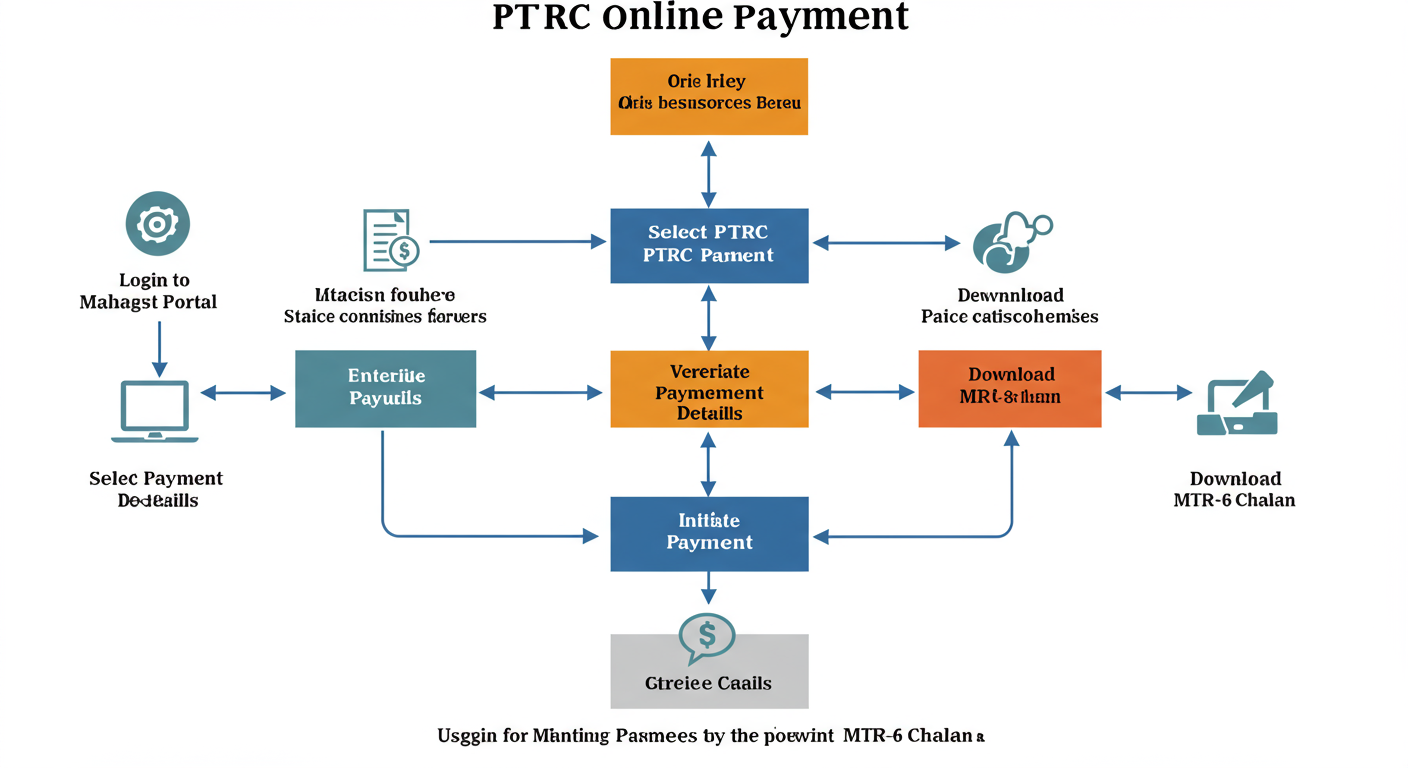
Your Goal: To file Form III-B and pay the deducted PT amount for a specific month.
- Head to the Official Hub: Open your browser and go directly to the Maharashtra GST Department (MGSTD) portal:
https://www.mahagst.gov.in/en. Bookmark this page. Don’t rely on searching for it every month, as you might land on unofficial or phishing sites. - Log In with Your TIN: On the right side of the homepage, find the ‘Login’ section. Your User ID is your PTRC TIN (a 12-digit number starting with ’27’ and ending in ‘P’). Enter your password and the captcha, then click ‘Login’.
- Navigate to Payments: Once you’re on your dashboard, look for the ‘Payments’ tab in the top navigation bar. Hover over it and select ‘Make Payment (New)’ from the dropdown menu. Simple.
- Select the Right Act: This is a critical step. On the payment screen, you’ll see a dropdown for ‘Act’. You MUST choose ‘PTRC Act’. The system will then automatically select the correct form for you, which is Form III-B.
- Fill the Return with Precision: Now you’re at the heart of the process. Double-check every field:
- Financial Year: Select the correct one, e.g., ‘2025-2026’.
- Period: Choose the month you’re paying for (e.g., ‘April’). Remember, you pay for April’s salaries by April 30th.
- No. of Employees: Enter the exact count of employees from whose salary PT was deducted this month. This must match your payroll records.
- Tax Amount: The system might auto-calculate this, but always verify it manually. It should be the total PT deducted (typically ₹200 per employee).
- Interest/Penalty: If you’re paying late, this is where you declare it. Calculate the interest (currently 1.25% per month) on the tax amount and enter it here. Don’t leave it blank if you’re past the due date.
- Proceed to the GRAS Gateway: After filling everything, click ‘Proceed to Payment’. You’ll be redirected to the Government Receipt Accounting System (GRAS). This is the secure state payment gateway.
- Complete the Transaction & Download Proof: On GRAS, choose your payment method (Net Banking is usually the smoothest). Once the payment is successful, an MTR-6 challan (your official receipt) will be generated. Do not skip this: Download, print, and save this challan immediately. It’s your only proof of payment.
💡 Pro Tip
For businesses with a tax liability under ₹1,00,000 in the previous year, you have the option to file an annual return instead of monthly ones. This can save a ton of administrative time. You’d pay the entire year’s tax by March 31st. Check your eligibility on the portal under ‘Return’ settings.
The Professional’s Path: Mastering Your PTEC Payment
If you’re self-employed or a company director, your life is even simpler. Your PTEC payment is a fixed annual amount (₹2,500), and you can pay it without even logging in. It’s a 2-minute job if you know where to click.
Your Goal: To pay the annual PTEC fee of ₹2,500 before the June 30th deadline.
- Visit the Mahagst Portal: Go to
https://www.mahagst.gov.in/en. - Find ‘e-Payments’: In the main menu, click on ‘e-Payments’. A dropdown will appear.
- Select Your Act: From the list, choose the option that says ‘PTEC’.
- Enter Your PTEC TIN: A simple form will load. Enter your PTEC TIN (the 12-digit number starting with ’27’ and ending in ‘E’). Select the financial year. The amount of ₹2,500 should be pre-filled.
- Pay via GRAS: Click ‘Proceed to Payment’. You’ll be taken to the GRAS gateway. Complete the payment using your preferred method.
- Save Your Challan: Just like with PTRC, download and securely save the MTR-6 challan. Set a calendar reminder for next June!
🎯 Key Takeaway
Professional Tax compliance in Maharashtra hinges on one thing: knowing your role. Employers manage monthly deductions via PTRC, while individuals and directors handle their own annual liability via PTEC. Use the official Mahagst portal for all payments and always save your MTR-6 challan as proof.
The Rules of the Game: Tax Slabs, Deadlines & Penalties for 2026
Knowing *how* to pay is only half the battle. Knowing *what* and *when* to pay is what keeps you out of trouble. Here’s a clear breakdown of the rules for 2026.
The tax slabs determine how much PT an employer needs to deduct from an employee’s salary. From our hands-on testing of payroll software, it’s crucial these slabs are correctly configured in your system.
Key Compliance Data at a Glance
To make it even easier, we’ve summarized the most critical data. Print this out and stick it on your wall if you have to! Understanding the TDS Late Filing Penalty: Section 234E Fees and Section 271H Consequences
| Category | Details | What to Watch For |
|---|---|---|
| Tax Slabs (Male Employees) | – Up to ₹7,500/month: Nil – ₹7,501 to ₹10,000/month: ₹175 – Above ₹10,000/month: ₹200 (₹300 in Feb) |
The ₹300 deduction in February is to make the annual total ₹2,500. Ensure your payroll accounts for this. |
| Exemption for Women | Women earning a gross salary up to ₹25,000 per month are exempt from Professional Tax. | This is a major recent change. Audit your payroll to ensure you are not incorrectly deducting PT from eligible female employees. |
| Due Dates | – PTRC: Last day of the month. – PTEC: 30th June of the financial year. |
These are strict deadlines. There is no grace period. Mark them in your compliance calendar. |
| Penalties | – Late Payment: Interest at 1.25% per month. – Late Filing: Penalty of ₹1,000 per return. |
Penalties are calculated automatically by the system. It’s cheaper to be on time. |
⚠️ Watch Out
The interest for late payment is calculated per month or part of a month. This means even if you’re one day late, you’re liable for a full month’s interest. It’s a costly mistake that’s easy to avoid with simple calendar alerts. Trademark Class 35: The 2026 Guide to Protecting Your Brand
💡 Pro Tip
If you’ve missed a deadline and need to pay interest, don’t just pay the base tax amount. Use the portal’s calculation feature or manually compute the interest and enter it in the ‘Interest’ field when making the payment. Paying only the tax amount will still leave your account in default.
Your Next Step: From Reading to Doing
You’re now equipped with the knowledge that separates compliant, stress-free businesses from those constantly looking over their shoulder. The process of professional tax payment online Maharashtra is no longer a mystery. It’s a clear, step-by-step procedure.
You know the difference between PTRC and PTEC. You have the exact steps for payment. You’re aware of the slabs, deadlines, and the costly penalties for slipping up. Industry research from firms like PwC consistently shows that robust internal processes are the number one defense against compliance errors.
So, what’s your immediate next step? Don’t just close this tab.
If you’re an employer, log in to the Mahagst portal right now and check your last payment status. Confirm the deadline for this month is in your calendar.
If you’re a professional, check if your PTEC payment for the current financial year has been made. If not, and the deadline is approaching, make the payment today.
Take one small action now, and turn this knowledge into peace of mind.
❓ Frequently Asked Questions
Is professional tax mandatory for all employees in Maharashtra?
No, it’s not. PT is only applicable for employees with a gross salary over ₹7,500 per month. Crucially, a recent amendment exempts women earning up to ₹25,000 per month from this tax. Ensure your HR and payroll teams are aware of this specific exemption.
I’m a freelancer working from home. Do I really need to pay this?
Yes. As a freelancer, you’re considered a self-employed professional. You are required to obtain a Professional Tax Enrollment Certificate (PTEC) and pay the annual tax of ₹2,500. The due date is June 30th each year. It’s a fixed cost of doing business professionally in the state.
What happens if I miss the PTEC payment deadline of June 30th?
If you miss the deadline, you’ll be liable for interest at 1.25% per month (or part of the month) on the ₹2,500 tax amount. The department may also levy a penalty for late enrollment or payment. It’s far more cost-effective to pay on time.
Where can I find my PTRC or PTEC number if I’ve lost it?
Your PTRC/PTEC number is your Tax Identification Number (TIN) issued by the MGSTD upon registration. It’s a 12-digit number starting with ’27’. You can find it on the registration certificate. If you can’t find the certificate, you may need to contact the MGSTD helpdesk or visit a local office with your PAN and business details to retrieve it.
Can I pay professional tax through my bank’s website?
Not directly. You must initiate the payment from the official Mahagst portal. The portal will then redirect you to the GRAS payment gateway, where you can select your bank from the list to complete the payment via net banking. Always start the process from the Mahagst website to generate the correct challan.
Is there an exemption for senior citizens?
Yes. According to the Act, senior citizens (individuals who have attained the age of 65 years) are exempt from paying Professional Tax. This applies to PTEC holders. For more specific exemptions, it’s always best to consult the official documentation on the Indian taxation system or the state’s tax portal.