Introduction: Why Your MSME Udyam Certificate Download Online Matters
For millions of small and medium enterprises across India, the Udyam Registration Certificate is more than just a piece of paper; it is the gateway to crucial government benefits, subsidies, and priority sector lending. Since the shift from Udyog Aadhaar to the Udyam system, the process has become entirely digital, making the ability to perform an MSME Udyam certificate download online a fundamental skill for every registered business owner.
This comprehensive guide walks you through the precise steps required to access, verify, and download your Udyam Certificate directly from the official government portal. Whether you are a newly registered micro enterprise or an existing SME seeking renewal documentation, understanding this process is essential for compliance and growth.
Within the first 100 words, we establish that the MSME Udyam certificate download online process is critical for accessing benefits and ensuring compliance, setting the stage for the detailed guide that follows.
Understanding Udyam Registration and Its Crucial Role
The Udyam Registration system, launched by the Ministry of MSME, simplifies the process of formally recognizing businesses based on their investment in plant and machinery/equipment and turnover. This self-declaration process is entirely paperless and based on the Permanent Account Number (PAN) and Goods and Services Tax Identification Number (GSTIN).
The Benefits of Having Your MSME Udyam Certificate Download Online Ready
Possessing the physical or digital copy of your Udyam Certificate is necessary when dealing with financial institutions, government tenders, and various regulatory bodies. Failure to produce it can delay critical business processes.
Access to Priority Sector Lending
Banks often provide loans at lower interest rates and with more favorable terms under the Priority Sector Lending mandates, exclusively for Udyam-registered entities.
Government Tenders and Subsidies
Eligibility for specific government schemes, subsidies, and reservations in public procurement (like the Public Procurement Policy for MSMEs).
Tax and Compliance Advantages
Potential exemptions in direct tax laws (e.g., certain capital gains) and easier compliance procedures compared to non-registered entities.
Protection Against Delayed Payments
The ability to approach the MSME Samadhan Portal for timely resolution of payment disputes with buyers.
If you are looking to formally register a small business in India, Udyam registration should be your very first step after incorporation.
Prerequisites for MSME Udyam Certificate Download Online
Before you begin the download process, ensure you have the following essential information readily available. This preparation prevents unnecessary delays and ensures a smooth transaction on the official portal.
- Udyam Registration Number (URN): This unique 16-digit number is assigned upon successful completion of your registration.
- Mobile Number: The mobile number linked to your Udyam Registration (used for receiving OTPs).
- PAN Card Details: Although not always required for the download itself, having your business PAN handy can be useful for verification steps.
Note: Since the Udyam system is linked directly to Aadhaar and PAN, there is no separate fee or complex documentation required specifically for the download process.
Step-by-Step Guide: MSME Udyam Certificate Download Online
The process for securing your official Udyam certificate is straightforward and must be performed exclusively on the official government portal. Beware of third-party websites that charge fees for this free service.
Phase 1: Accessing the Official Portal
- Navigate to the Official Udyam Registration Portal: Ensure you are using the correct government website (typically the one ending in .gov.in).
- Locate the ‘Print/Verify’ Section: On the homepage, look for a menu option clearly labeled ‘Print/Verify’ or ‘Print Udyam Certificate’.
- Select ‘Print Udyam Certificate’: Click on this option to initiate the login prompt.
Phase 2: Authentication and Verification
- Enter Udyam Registration Number (URN): Input your unique URN accurately into the designated field.
- Enter Mobile Number: Input the mobile number that was used during the initial Udyam registration process.
- Choose OTP Option: You will typically have two options for OTP verification:
- OTP on Mobile (linked to Aadhaar).
- OTP on Email (linked to Udyam).
Select the preferred method.
- Validate OTP: Enter the One-Time Password received on your selected device and click ‘Validate & Generate Certificate’.
Phase 3: Finalizing the MSME Udyam Certificate Download Online
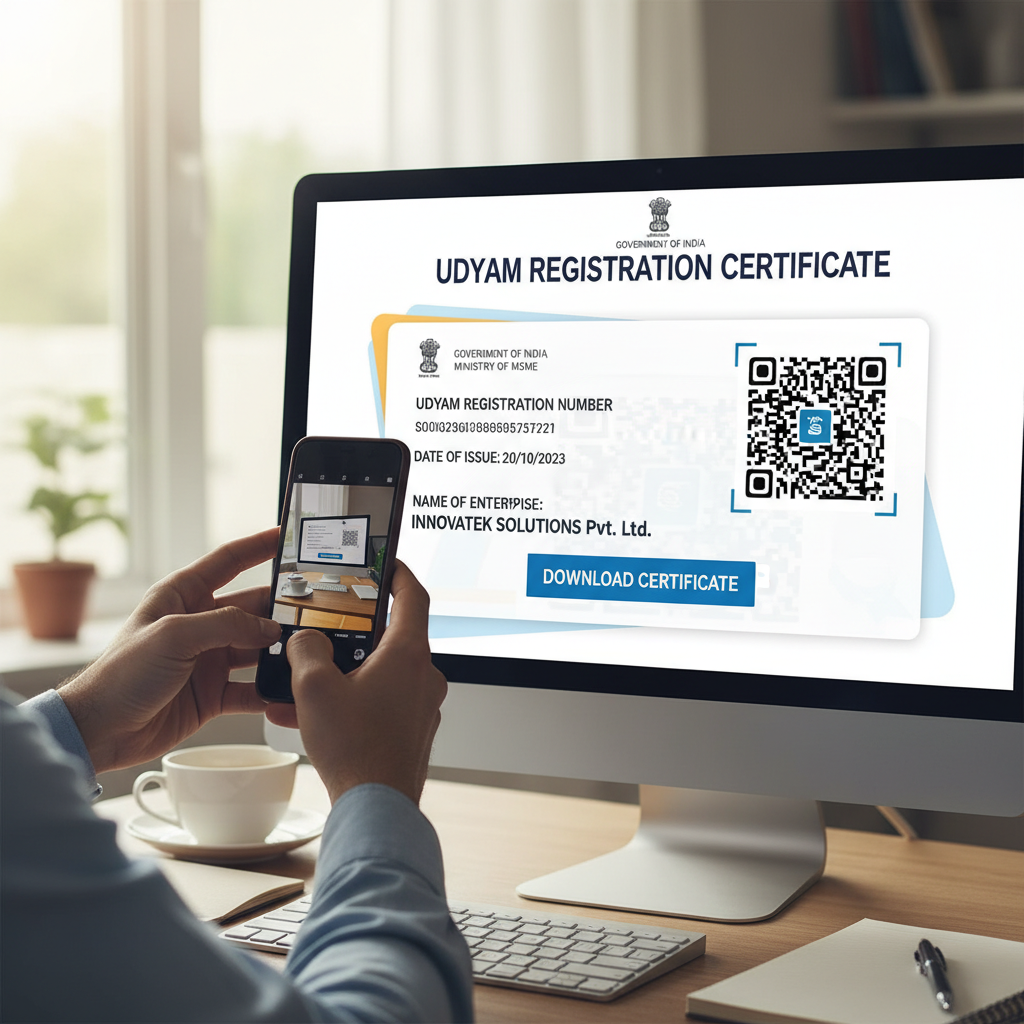
- View the Certificate: The system will display your complete Udyam Registration Certificate, showing the date of issue, industry classification, investment, and turnover figures.
- Select Print Option: Look for the button labeled ‘Print Certificate’ (or similar). This action opens the standard print dialogue box.
- Download as PDF: Instead of printing directly, change the destination printer in the dialogue box to ‘Save as PDF’ or ‘Microsoft Print to PDF’. This creates a digital, high-resolution file of your certificate.
This systematic approach ensures you secure the authentic, digitally signed document necessary for all official purposes. If you face difficulties, professional assistance is available through dedicated MSME Services.
Verifying the Authenticity of Your Udyam Certificate
While performing the MSME Udyam certificate download online, it is crucial to understand how to verify its authenticity. Banks, government agencies, and major vendors often cross-check the details provided.
Key Verification Features
The Udyam Certificate generated online contains several security features that prove its legitimacy:
- QR Code: Every certificate includes a unique QR code. Scanning this code should redirect the user to the official Udyam portal showing the live data corresponding to the URN.
- Digital Signature: The certificate is digitally signed by a competent authority, ensuring that the document has not been tampered with since its generation.
- Date of Issue and Classification: Ensure the date of issue and the official classification (Micro, Small, or Medium) align with your current business structure.
“The Udyam Registration process is designed to be fully transparent and verifiable. The digital certificate, once downloaded, serves as definitive proof of MSME status for all statutory and financial requirements.” – Ministry of Micro, Small & Medium Enterprises, India.
Troubleshooting Common Issues During MSME Udyam Certificate Download Online
While the digital platform is robust, users occasionally encounter minor technical hurdles. Knowing how to resolve these quickly can save significant time and frustration.
Issue 1: OTP Not Received
Solution: Verify that you are using the exact mobile number linked to the Aadhaar/PAN during registration. Check spam folders if using email OTP. Wait 5 minutes before requesting a resend. Ensure network connectivity is stable.
Issue 2: Incorrect Udyam Registration Number
Solution: The URN is a 16-digit alphanumeric code (e.g., UDYAM-XX-00-0000000). Double-check the input. If you cannot locate your URN, use the ‘Forgot URN’ option, if available, or contact the Udyam helpdesk.
Issue 3: Certificate Data Mismatch
Solution: If details like investment or business activity are incorrect, you cannot simply download the certificate. You must first use the ‘Update/Modification’ option on the portal to correct the data before attempting the MSME Udyam certificate download online again.
Maintaining Compliance and Updating Your Udyam Status
Registration is not a one-time event. MSME status classification is dynamic, relying on annual turnover and investment figures. Businesses are required to update their details annually.
Why Annual Updation is Mandatory
If your business grows and crosses the threshold limits for a Micro enterprise (e.g., moves into the Small category), your classification must be updated. This ensures that the downloaded certificate reflects your current, accurate status when presented to lenders or government bodies.
According to guidelines set by the Ministry of MSME, mandatory updates ensure the integrity of the data used for policy formulation and benefit disbursement. For detailed official information regarding the classification criteria, always refer to the official Government of India notifications on MSME classification.
Ensuring Digital Security When You Perform MSME Udyam Certificate Download Online
Since the Udyam certificate contains sensitive business data, including investment and PAN details, safeguarding the downloaded PDF is critical. Always download the certificate on a secure, private computer and avoid public Wi-Fi networks during the authentication process.
Secure Storage Practices
Store the downloaded PDF in an encrypted folder or a secure cloud storage service, restricting access only to authorized personnel.
Sharing Protocols
Share the certificate only with recognized, trusted entities (like banks, government portals, or certified auditors). Never upload it to unverified websites.
Regular Backups
Keep multiple backups, including a hard copy, in case of system failure or data loss, ensuring you always have access to this vital document.
The Udyam system represents a significant step towards digitizing and simplifying business compliance in India. By mastering the MSME Udyam certificate download online process, business owners ensure they remain compliant and ready to leverage the vast array of support mechanisms available to registered MSMEs, including schemes often facilitated by institutions like the Reserve Bank of India (RBI) through its guidelines on lending.
Conclusion: Seamless Access to MSME Benefits
The Udyam Registration Certificate is the backbone of your small business’s official standing in India. The ability to perform a reliable and secure MSME Udyam certificate download online is fundamental to accessing financial incentives, participating in government programs, and maintaining credibility with stakeholders.
By following the steps outlined above, you can ensure that you always have an authentic, up-to-date copy of your certification, enabling your business to operate smoothly and capitalize on the support structures designed specifically for the MSME sector.
FAQs
No. The Udyam Registration process, including the application, modification, and subsequent download of the certificate, is entirely free of cost on the official government portal. If a third party charges you, they are charging for their service, not the certificate itself.
You only need to download a new certificate if you have made an official modification or update to your registration details (e.g., changes in investment or turnover that affect your classification). Otherwise, the original downloaded certificate remains valid unless a specific authority requires a recently dated printout.
If you lose your URN, you should visit the official Udyam portal and look for the ‘Print/Verify’ section. There is usually an option to retrieve your URN using your registered Aadhaar number and the associated mobile or email address through an OTP verification process.
No. OTP verification using the registered mobile number or email address is a mandatory security step to authenticate the request and prevent unauthorized access to sensitive business data. You must have access to one of the registered contact methods.
The Udyam Certificate itself does not have a fixed expiry date. However, the status (Micro, Small, Medium) is subject to annual revalidation based on the self-declared turnover and investment data linked to your Income Tax returns (ITR) and GST filings. Non-compliance with annual updates can affect its validity in the eyes of lenders.