Imagine this scenario: You’ve spent three years building your brand. The logo is perfect. The customers are loyal. You’re finally turning a profit. Then, one Tuesday morning, you get a cease-and-desist letter. Someone else owns your brand name.
It’s a nightmare, but it happens more often than you think.
In 2026, your brand is your most valuable asset. Protecting that asset isn’t just “nice to have”—it is the only thing standing between you and a total rebrand. The good news? You no longer need to drown in paperwork or stand in long queues at the registry office. The government has overhauled the system, allowing business owners to e register trademark applications directly from their laptops.
But here’s the thing: while the system is digital, it’s not foolproof. One wrong code or a blurry document can set you back months.
I’ve navigated the intellectual property maze for over a decade, helping startups and enterprises secure their identities. This isn’t just a generic overview. This is your insider’s guide on how to e register trademark filings effectively, avoid the traps that catch 40% of applicants, and secure your legacy.
Why You Must E Register Trademark in 2026
Let’s be real. The traditional method of filing trademarks was a bureaucratic headache. It was slow, opaque, and expensive. The shift to digital filing hasn’t just made things easier; it has fundamentally changed the speed of business protection.
When you choose to e register trademark online, you aren’t just saving a trip to the patent office. You are buying speed and accuracy. The moment you file electronically, you get an instant acknowledgment. That means you can start using the coveted “TM” symbol next to your brand name immediately. You don’t have to wait for the certificate to warn copycats off.
Here is how the two methods stack up against each other:
| Feature | Traditional Physical Filing | E-Filing (Online) |
|---|---|---|
| Filing Fee | Standard Government Rates | 10% Discount on Government Fees |
| Acknowledgment | Takes 15-30 days by post | Instant (Immediate use of “TM”) |
| Error Rate | High (Manual data entry) | Low (Automated validation checks) |
| Status Tracking | Difficult, requires office visits | Real-time 24/7 online tracking |
The data is clear. Electronic filing is faster, cheaper, and safer. But before you rush to the portal, you need to do your homework.
Phase 1: The Critical Prep Work
Most rejections happen because people skip this phase. They get excited, log in, and start typing. Don’t be that person.
1. The “Knockout” Search
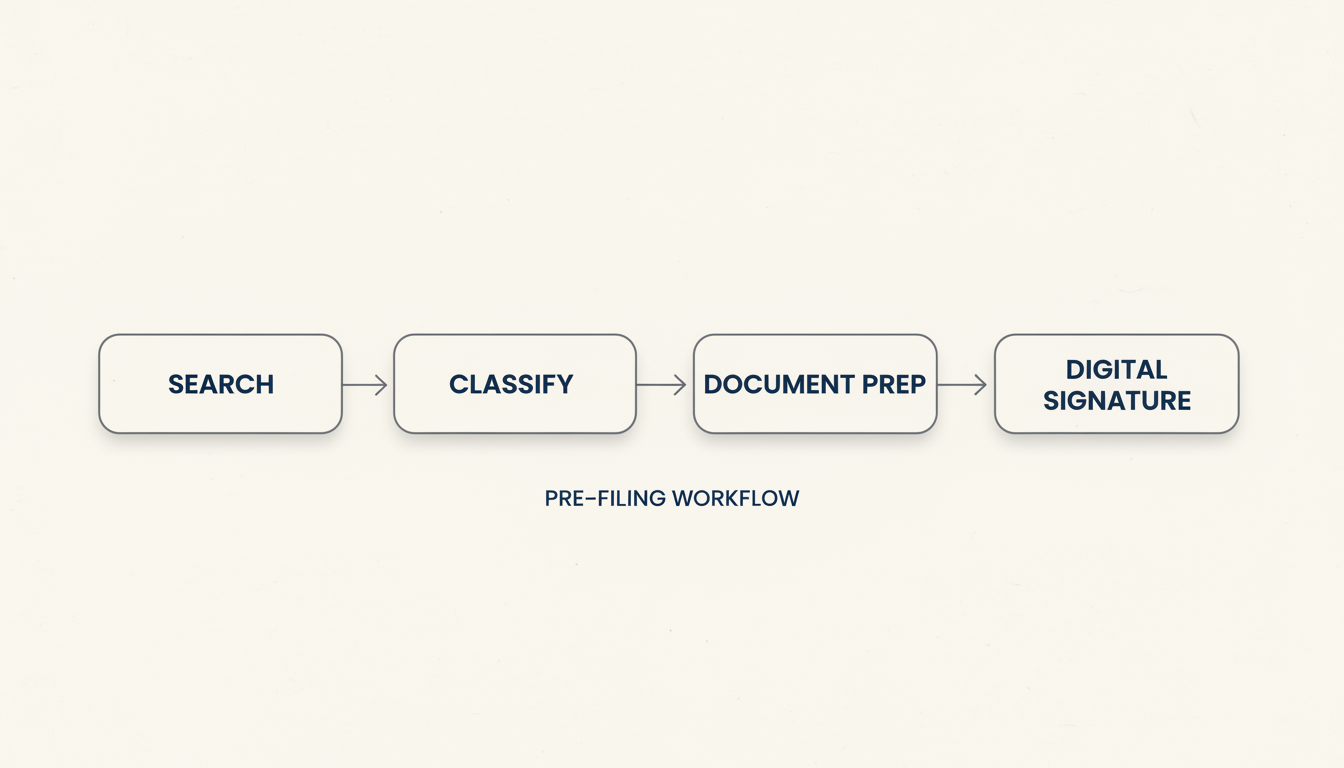
Before you spend a dime, you need to know if your name is available. You can’t just check if the domain name is open. You need to search the official trademark database. If a similar name exists in your business category (phonetically similar counts, too!), your application will likely be rejected.
💡 Pro Tip
Don’t just search for the exact name. Search for misspellings and phonetic equivalents. If you want to register “KwikFix,” check for “QuickFix,” “QuikFix,” and “KwickFix.” The registry looks for confusion, not just identical spelling.
2. Class Selection: The Most Common Trap
Trademarks are categorized into 45 different classes. Classes 1-34 are for goods (products), and 35-45 are for services.
If you sell coffee beans, you are in Class 30. If you run a coffee shop, you are in Class 43. If you do both, you need to file in both classes. Filing in the wrong class gives you zero protection for your actual business.
⚠️ Watch Out
The Class 35 Trap: Many applicants mistakenly file under Class 35 (Advertising/Business Administration) thinking it covers everything. It doesn’t. Unless you are an ad agency or a business consultant, Class 35 is likely wrong for your core product.
Phase 2: Documents You Need Ready
The online system times out if you take too long. Have these scanned and ready on your desktop before you start the process to e register trademark.
- Identity Proof: PAN card or Passport (for individuals).
- Business Proof: Udyam Registration (MSME) or Incorporation Certificate.
- Logo/Brand Image: A high-resolution JPEG. If you are trademarking a word, you don’t need a logo.
- User Affidavit: Only required if you are claiming you have used the brand before today. This is powerful evidence, so use it if you have it.
- Digital Signature Certificate (DSC): You cannot file without this. It’s a USB token that acts as your digital ID.
Phase 3: Step-by-Step Guide to E Register Trademark
Ready? Let’s walk through the actual process on the official IP India portal. This is the standard procedure for 2026.
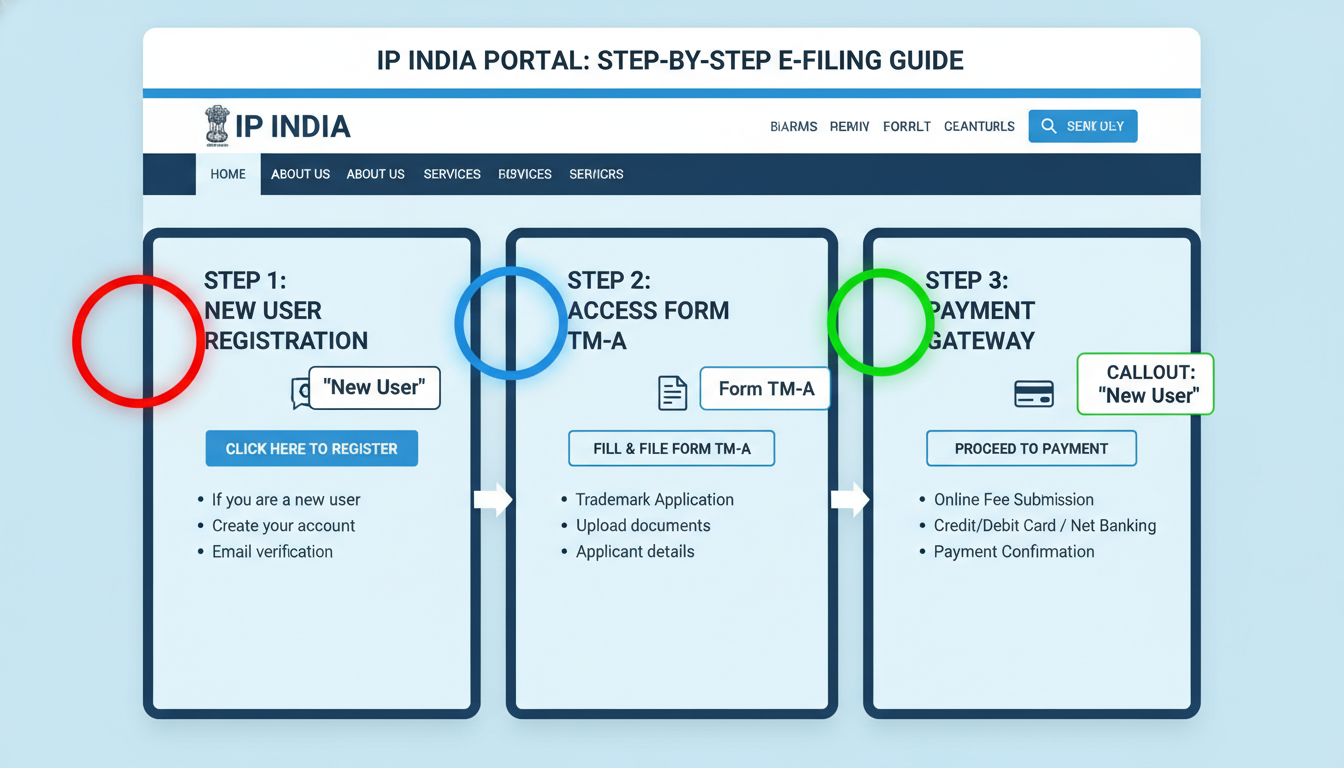
Step 1: Acquire Your Class 3 DSC
Unlike creating a Facebook account, you need a Class 3 Digital Signature Certificate (DSC) to access the legal gateway. You can buy this from licensed Certifying Authorities (like eMudhra or Sify). It usually comes as a USB token. 80G Registration under Income Tax Act
Step 2: Register on the IP India Portal
Visit the official Intellectual Property India website. Click on “Trademark” and then “New User Registration.” You will need to install a component on your computer that allows the browser to read your USB DSC token. Once verified, you’ll get your login credentials.
Step 3: File Form TM-A
This is the main application form.
- Log in and select “New Application.”
- Choose “Form TM-A.”
- Select your category: Individual/Startup/Small Enterprise (lower fees) or Others (higher fees).
- Enter your trademark details and the Class you identified earlier.
- Description of Goods: Be specific. Don’t just write “Clothing.” Write “Ready-made garments, specifically shirts, trousers, and jackets.”
Step 4: Upload and Pay
Upload your JPEG logo and PDF documents. The system will validate the file sizes. Once done, proceed to the payment gateway.
The Cost Breakdown (2026 Estimates):
| Applicant Type | Government Fee (Per Class) |
|---|---|
| Individual / Sole Proprietor | ₹4,500 |
| Startup / MSME (Small Enterprise) | ₹4,500 |
| Company / LLP / Partnership | ₹9,000 |
Note: These are government fees. If you hire a lawyer, their professional fees are extra.
🎯 Key Takeaway
The moment you successfully pay and generate your Application Number, you can legally use the TM symbol. Do not use the ® symbol yet—that is illegal until your registration is fully approved, which takes 6-18 months.
Phase 4: What Happens After You Click Submit?
Many people think the job is done after payment. It’s not. In fact, the real work often starts here. Once you e register trademark forms, your application enters a rigorous cycle.
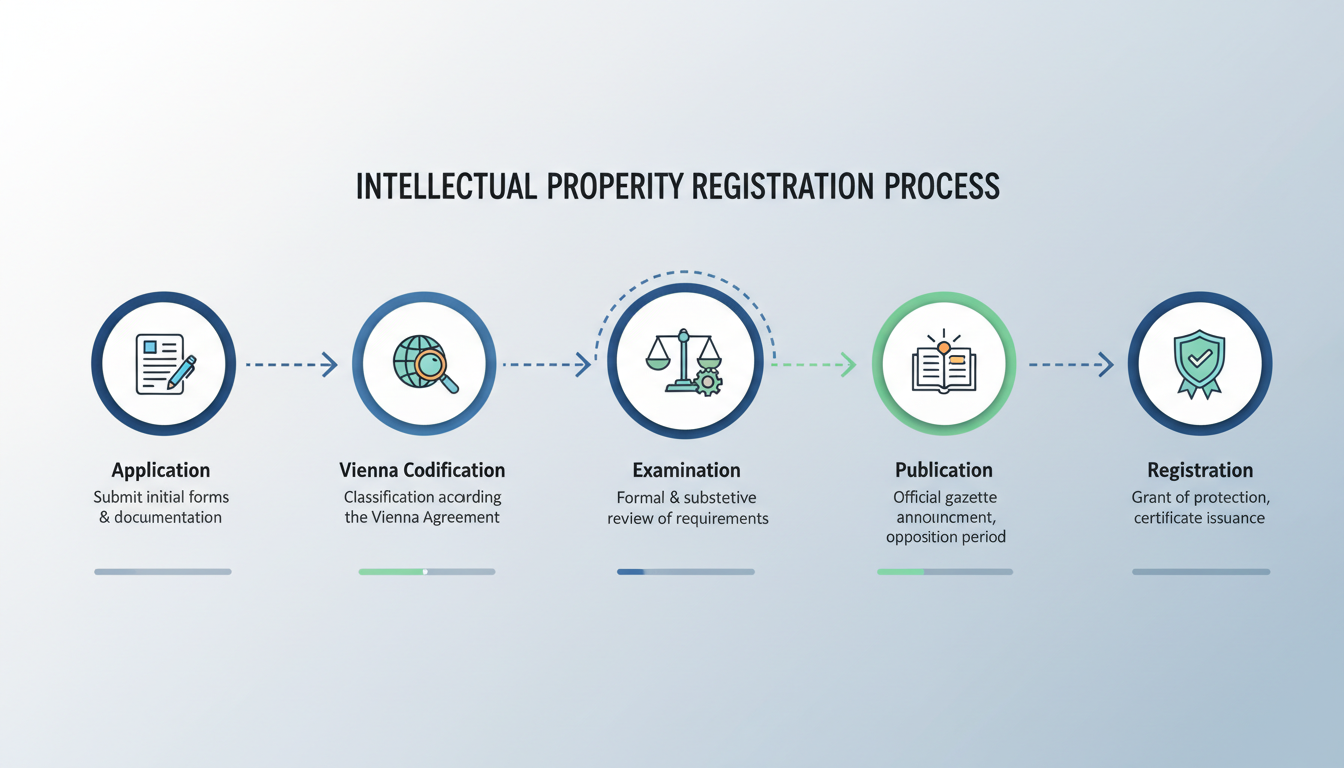
- Vienna Codification: If you have a logo, the registry assigns it a code based on its visual elements (e.g., “lion,” “triangle”).
- Examination Report: This is the big hurdle. A trademark officer reviews your application. If they find it too similar to an existing mark or too generic (like trying to trademark the word “Best Apple” for selling apples), they will issue an Objection.
- Response to Objection: You have 30 days to reply legally. If you ignore this, your application is abandoned.
- Journal Publication: If the officer accepts your mark, it gets published in the Trademark Journal. This is a 4-month window where the public can oppose your mark.
- Registration: If no one opposes it for 4 months, congratulations! You get your Registration Certificate.
⚠️ Watch Out
The “Descriptive” Mistake: The registry hates descriptive terms. You cannot trademark “Sweet Ice Cream” for an ice cream brand. It describes the product. You can trademark “Hagen-Dazs” because it’s a made-up word. Unique names get approved faster.
Conclusion
Deciding to e register trademark is one of the smartest strategic moves you can make for your business in 2026. It transforms your intangible ideas into concrete, legally protected assets that add valuation to your company. It builds trust with investors and gives you the legal hammer to stop copycats.
While the online infrastructure has made the process accessible, it still demands precision. From acquiring your Digital Signature to selecting the right Class, every step matters. Don’t leave your brand’s future to chance. Whether you do it yourself or hire a professional, get it done. Your future self will thank you.
❓ Frequently Asked Questions
Can I e register trademark on my own without a lawyer?
Yes, you can. The online system is designed for public use. However, if your trademark faces an objection or legal opposition, the paperwork becomes complex. We recommend consulting a professional for the search and objection phases to ensure success.
How long does the entire process take?
In a best-case scenario (no objections, no oppositions), it takes about 6 to 8 months. If there are legal hurdles, it can take 18 months or longer. However, you are protected from the date of application.
What happens if my application is rejected?
If the registrar refuses your application after a hearing, you can appeal to the High Court (following the abolition of the IPAB). This is a costly and lengthy legal process, which is why getting the application right the first time is crucial.
Is the government fee refundable?
No. Once you pay the fee to e register trademark, it is non-refundable, even if your application is rejected or abandoned.
Does an Indian trademark protect me globally?
No. Trademarks are territorial. An Indian registration only protects you in India. For international protection, you need to apply via the Madrid Protocol or file separately in each country. You can learn more about international standards at the World Intellectual Property Organization (WIPO).
For more details on small business benefits, check the Ministry of MSME website to see if you qualify for fee rebates.